
Introduction
VPN Safe publishes two OpenVPN packs and two in-app OpenVPN modes. The difference is the carrier protocol, not the encryption.
- UDP (port 1194 in our configs) — faster, lower overhead. Use this first. Zip: vpnsafe.net/downloads/openvpn-udp.zip. In the VPN Safe app this is OpenVPN UDP — Fastest OpenVPN - good all-rounder.
- TCP — more reliable on networks that drop UDP (some hotels, corporate Wi-Fi, badly behaved CGNAT). Zip: vpnsafe.net/downloads/openvpn-tcp.zip. In the app this is OpenVPN TCP — More reliable on strict networks.
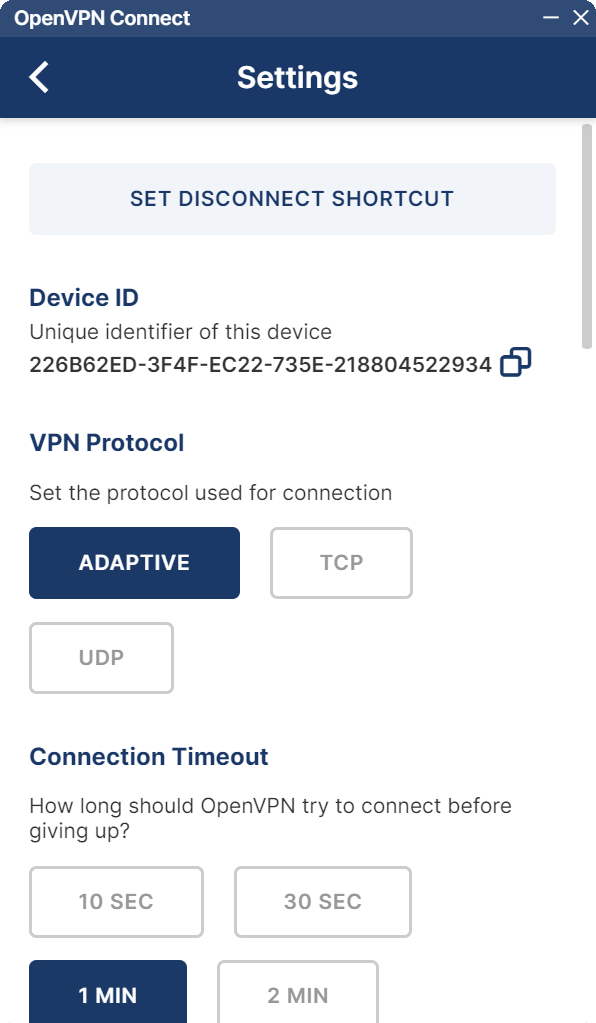
In OpenVPN Connect
Settings > VPN Protocol can be ADAPTIVE, TCP, or UDP. Adaptive tries what the profile allows. If you imported a UDP profile, keep UDP or Adaptive. If UDP will not connect, import a TCP profile instead of forcing TCP on a UDP file.
In the VPN Safe app
You do not need the zip files. Settings > Protocol > OpenVPN UDP or OpenVPN TCP is enough. Use WireGuard before either OpenVPN mode unless you have a reason not to.


